Klonify

AI VIDEO EDITOR

AI video editor: finish your TikTok Shop video without switching tools.

AI video editor: finish your TikTok Shop video without switching tools.

AI video editor: finish your TikTok Shop video without switching tools.

Cut the extra footage, add on-screen text and drop in an AI voiceover, whether your video comes from Klonify, your own files or your TikTok account. The editor is included in all three plans.

Cut the extra footage, write your on-screen text, and add an AI voiceover, whether your video comes from Klonify, your files, or your TikTok account. The editor is included in all three plans.

AI video editor

Klonify's AI video editor interface

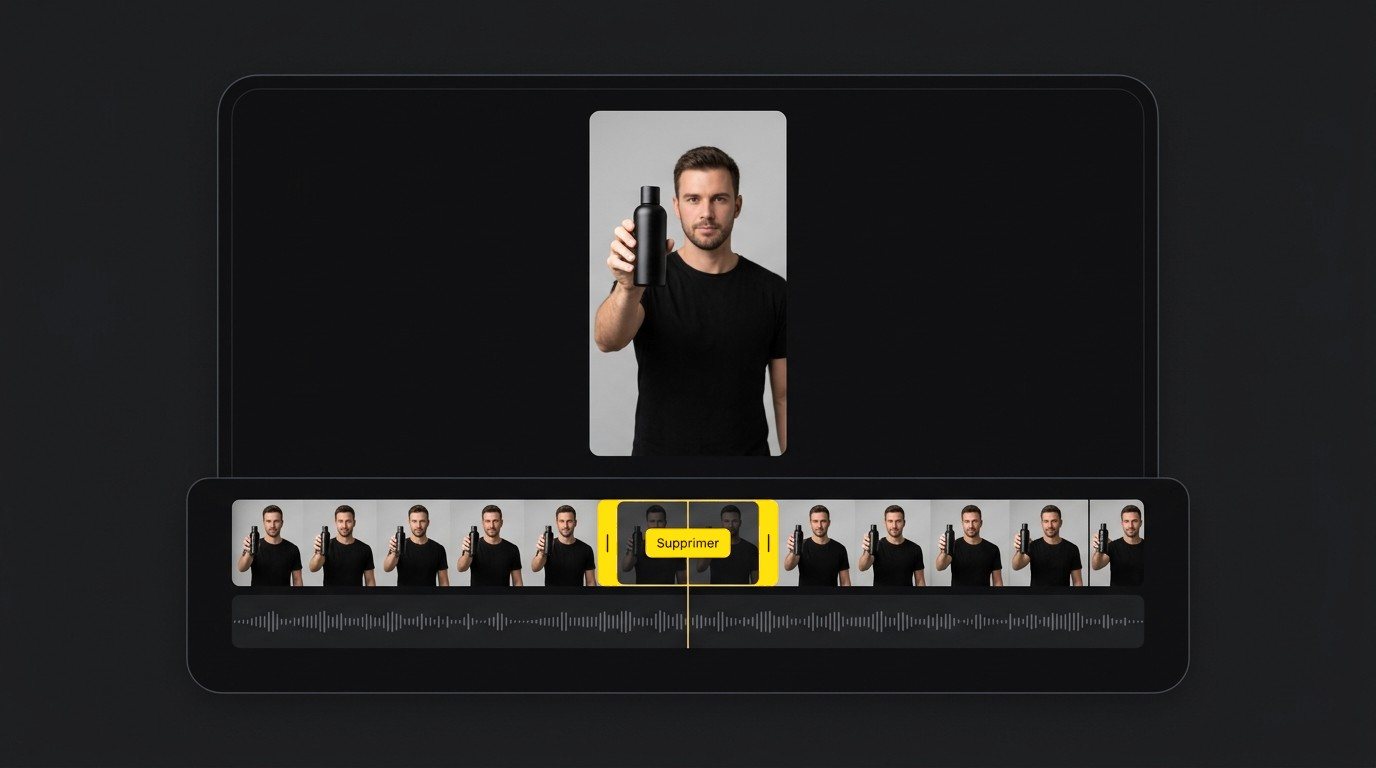
A clip selected on the timeline, with video and audio lined up below the video preview.

What is an AI video editor?

An AI video editor helps you edit videos with artificial intelligence. Klonify's editor, built in France by a tool that generates sales videos for TikTok Shop, brings your videos, images and audio together on one timeline: you cut, you add text, the AI turns your script into a voiceover, then you export. Included in every plan, from €19/month.

No more switching between two apps

Generating a video in one tool, downloading it, then reopening it in an editing app eats up time with every tweak. Here, your Klonify-generated video and your own files are edited in one place, then exported.

Keep only the parts that drive sales

A long intro or a duplicate shot delays the moment viewers see the product. Split and Delete remove the clip from the timeline, and Duplicate lets you reuse an element.

Explain what the visuals can't

Add an on-screen detail with the Text tool, or a voiceover with the AI Voice panel, in French or English. Missing a shot? The Media panel lets you search for photos and videos.

EDITING

Cut the extra part, right where it belongs.

Cut the extra footage, right where it counts.

Cut the extra footage, right where it counts.

Select the moment on the timeline and click Delete: the rest of the video stitches itself back together.

Video and audio are stacked one above the other, so you can cut down to the exact word.

AI video editor timeline with a clip selected and the Delete button

Add your text to the video.

Write your text right on the video.

Type your message, pick its position and style: it shows up on your video at the exact moment you need it.

Video of a woman holding a bottle, with on-screen text added and a color picker
Video track and voice track with a choice of Anna, Alexandre and Anaïs, and the Done button

Add an AI voice without remaking the video.

Add an AI voice without remaking the video.

Pick a voice in the AI Voice panel: the narration drops onto the audio track, right under your shots.

COMPARISON

Klonify or CapCut for editing your TikTok Shop videos?

CapCut is a full video editor for web, desktop and mobile, with text-to-speech, auto captions and AI image and video generation. The Klonify editor focuses on quick edits: cut, duplicate, add text and an AI voice. Its real strength is elsewhere: your script, voiceover and TikTok Shop video all come from the same subscription.

Klonify compared to CapCut
CriteriaKlonifyCapCut
Built forFinishing a TikTok Shop sales video before you post itGeneral video editing on web, desktop and mobile
AI voiceoverAI Voice panel: English or French voicesText-to-speech in the timeline, 200+ voices advertised
Voice settingsChoose the voice and when it startsSpeed from 0.5x to 2.0x, pitch from -12 to +12
On-screen textText tool: pick the position and styleAuto captions listed among its tools
Before editingScripts, checker and TikTok Shop video generation includedAI image and video generation
Starting price€19/month, editor and 4 apps included (all 7 from Pro)Standard €11.99, Pro €23.99/month (App Store France)

Who's it for?

Go with CapCut if you edit all kinds of videos and want auto captions and fine-tuned voice controls, from €11.99/month on the App Store. Go with Klonify if your videos are made to sell on TikTok Shop and you want to generate the video, write the script, add the voiceover and make your edits in one tool.

Comparison based on official websites as of 09/16/2026.

COMPARISON

Klonify or CapCut for editing your TikTok Shop videos?

CapCut is a full video editor for web, desktop and mobile, with text-to-speech, auto captions and AI image and video generation. The Klonify editor focuses on quick edits: cut, duplicate, add text and an AI voice. Its real strength is elsewhere: your script, voiceover and TikTok Shop video all come from the same subscription.

Klonify compared to CapCut
CriteriaKlonifyCapCut
Built forFinishing a TikTok Shop sales video before you post itGeneral video editing on web, desktop, and mobile
AI voiceoverAI Voice panel: English or French voicesText-to-speech in the timeline, 200+ voices advertised
Voice settingsPick the voice and when it startsSpeed from 0.5x to 2.0x, pitch from -12 to +12
On-screen textText tool: placement and style of your choiceAuto captions listed among its tools
Before editingScripts, checker, and TikTok Shop video generation includedAI image and video generation
Starting price€19/month, editor and 4 apps included (all 7 from Pro)Standard €11.99, Pro €23.99 per month (App Store France)

Who's it for?

Go with CapCut if you edit all kinds of videos and want auto captions and fine-tuned voice controls, from €11.99/month on the App Store. Go with Klonify if your videos are made to sell on TikTok Shop and you want to generate the video, write the script, add the voiceover and make your edits in one tool.

Comparison based on official websites as of 09/16/2026.

COMPARISON

Klonify or CapCut for editing your TikTok Shop videos?

CapCut is a full video editor for web, desktop and mobile, with text-to-speech, auto captions and AI image and video generation. The Klonify editor focuses on quick edits: cut, duplicate, add text and an AI voice. Its real strength is elsewhere: your script, voiceover and TikTok Shop video all come from the same subscription.

Klonify compared to CapCut
CriteriaKlonifyCapCut
Built forFinishing a TikTok Shop sales video before you post itGeneral video editing on web, desktop, and mobile
AI voiceoverAI Voice panel: English or French voicesText-to-speech in the timeline, 200+ voices advertised
Voice settingsPick the voice and when it startsSpeed from 0.5x to 2.0x, pitch from -12 to +12
On-screen textText tool: placement and style of your choiceAuto captions listed among its tools
Before editingScripts, checker, and TikTok Shop video generation includedAI image and video generation
Starting price€19 per month, editor and 4 apps included (all 7 with Pro)Standard €11.99, Pro €23.99 per month (App Store France)

Who's it for?

Go with CapCut if you edit all kinds of videos and want auto captions and fine-tuned voice controls, from €11.99/month on the App Store. Go with Klonify if your videos are made to sell on TikTok Shop and you want to generate the video, write the script, add the voiceover and make your edits in one tool.

Comparison based on official websites as of 09/16/2026.

Three edits that make your TikTok Shop video clearer.

Three quick edits that make your TikTok Shop video clearer.

Three quick edits that make your TikTok Shop video clearer.

Start from the edit you already have. Each tweak helps viewers follow along and understand the product.

Cut the intro before the product shows up

Select the opening seconds where the product isn't on screen yet and delete them. Your video now opens right on the product in hand.

Show key info at the right moment

Add the product name, a how-to step, or a detail from the product page right when the visual shows it.

A voice to explain each step

Create a voiceover in the AI Voice panel, play it with the visuals, and adjust your edit so viewers have time to see each step.

See the details in Klonify.

Find all the details in Klonify.

How it works

From product to TikTok Shop video in 3 steps.

Sign up free
Step 1: Add the product you want to feature.

STEP 1

Add the product you want to feature.

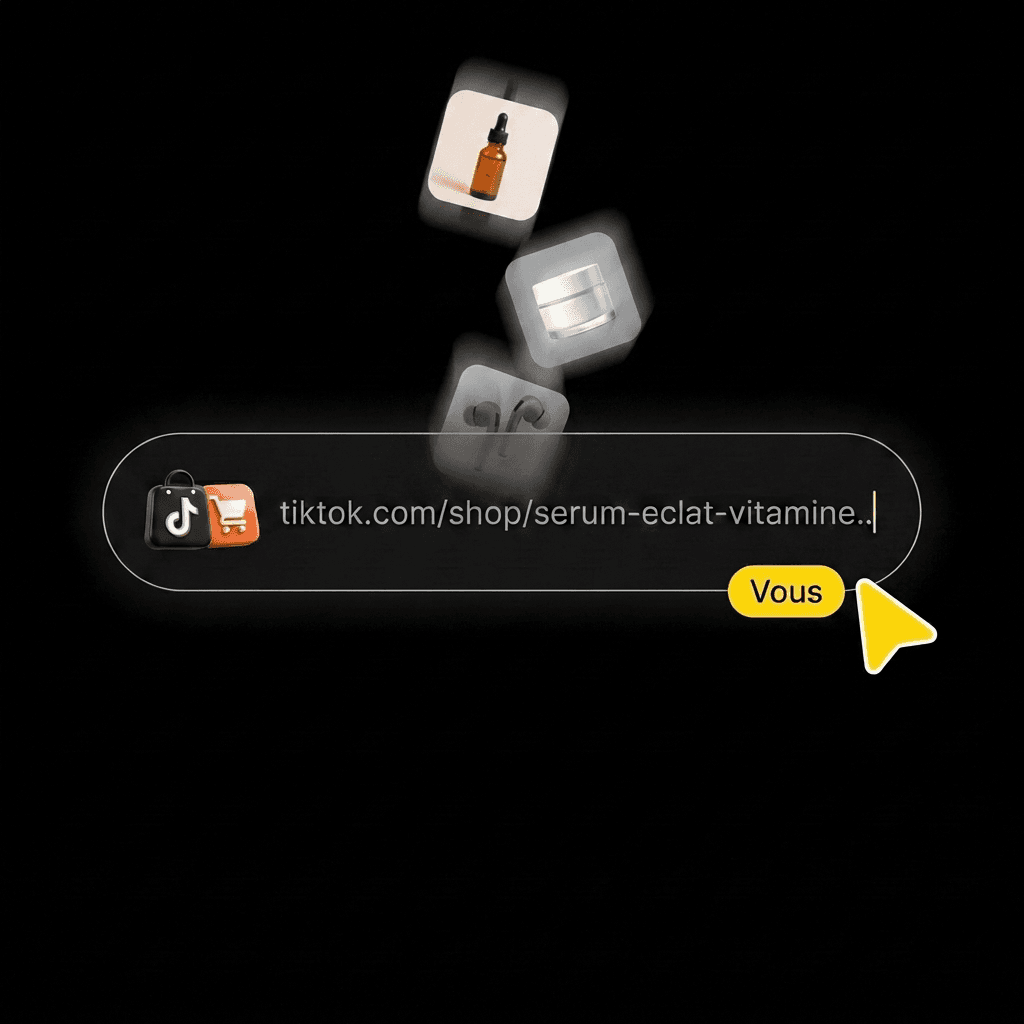
Paste its TikTok Shop link, upload a photo or pick it from your library.
Step 2: Create your video with AI.

STEP 2

Create your video with AI.

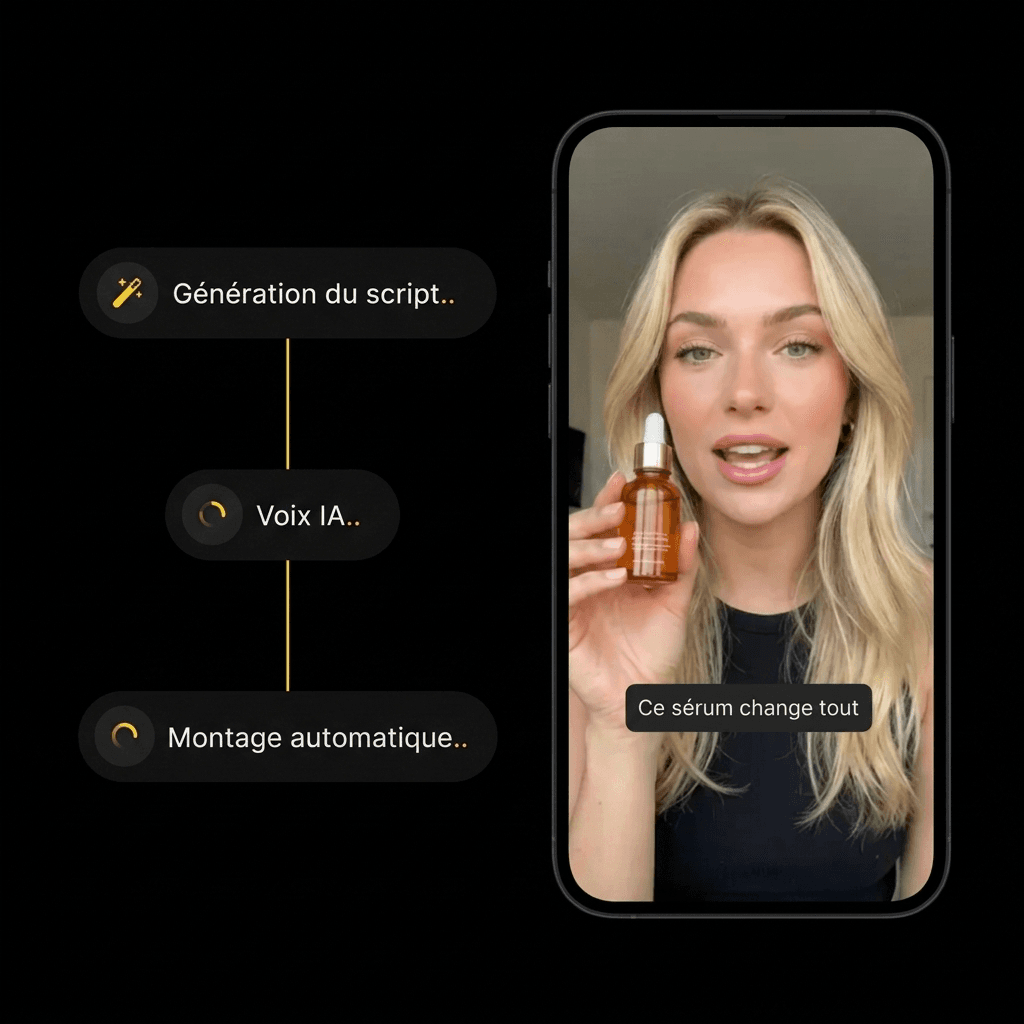
Choose an AI influencer and a scene. Hit generate, then check out the result.
Step 3: Post your video with the product linked.

STEP 3

Post your video with the product linked.

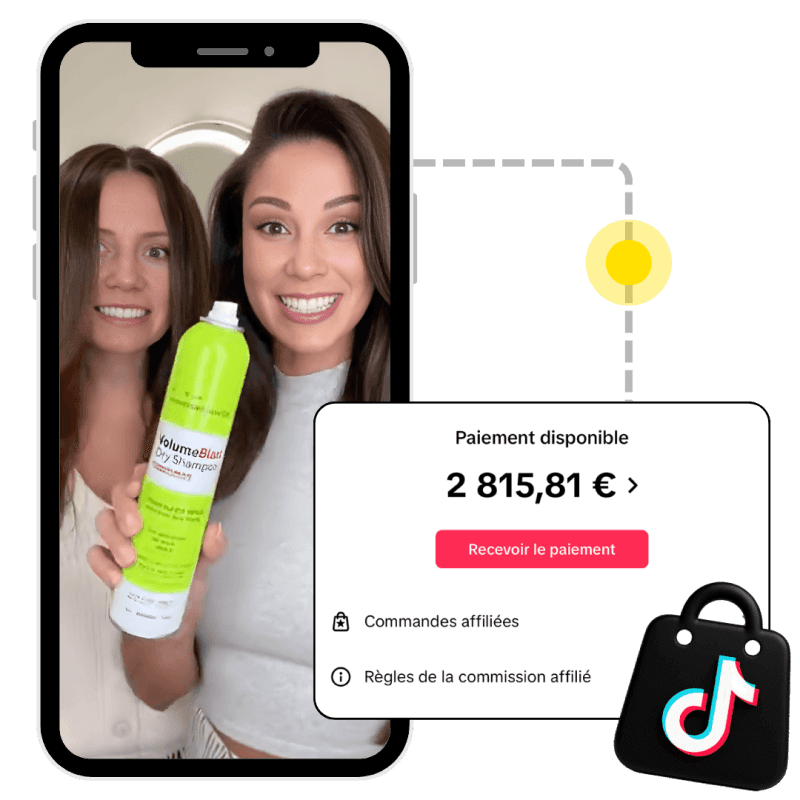
Someone buys the product from your video: the brand pays you your commission.

Frequently asked questions

Frequently asked questions

Frequently asked questions

Imports, TikTok links, on-screen text, pricing: answers before you edit your video.

Where does AI come in with Klonify's AI video editor?

Is there a free AI video editor?

How do you edit a TikTok video with AI?

Can I upload my own videos?

Can I pull in a video from TikTok?

Can I add on-screen text?

How is this different from the Klonify video generator?

Find all the details in Klonify.

Find all the details in Klonify.

Keep exploring

Keep exploring

Learn more

AI Voice Generator

Explore →

AI Image Generator

Explore →

Subtitle Remover

Explore →

Find all the details in Klonify.

Find all the details in Klonify.

The Klonify solution

Cut, add text, and drop in your AI voice without leaving Klonify.

Generate your video, polish it on the timeline, and export it in one place, ready to post on TikTok Shop.

Sign up for free

Free sign-up

2,700+Active creators
€2M+In sales generated on TikTok Shop
5 minFor a video ready to post